

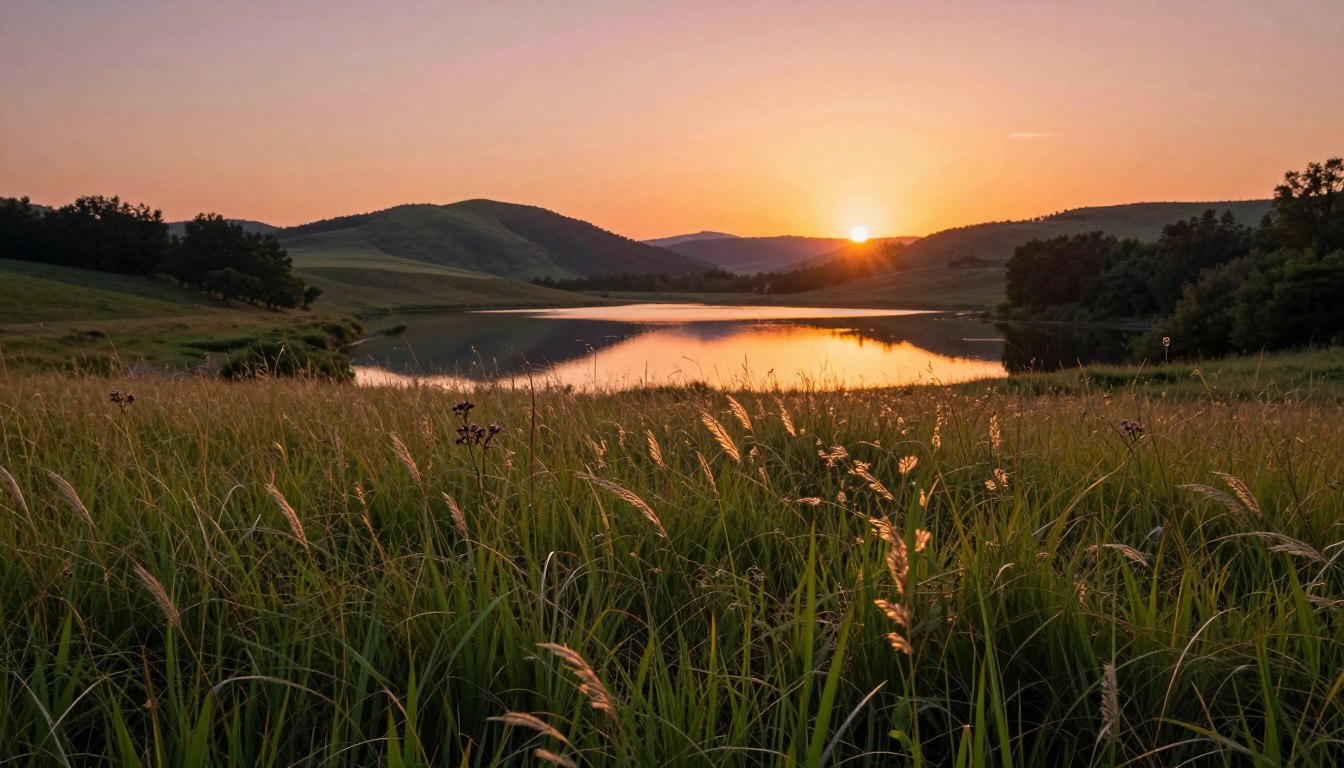
Capturing the golden hour is a coveted moment for photographers, as it offers a soft, warm light that enhances the beauty of any scene. To make the most of this fleeting moment, photographers often rely on preset settings in Lightroom to achieve a consistent and stunning look.
With the right Lightroom presets, you can enhance the natural colors and tones of your photos, giving them a professional touch. For those looking to elevate their golden hour photography, resources like lpresets.com offer a wide range of presets designed to capture the essence of this magical hour.
Key Takeaways
- Understand the importance of preset settings for golden hour photography.
- Learn how Lightroom presets can enhance your photos.
- Discover resources like lpresets.com for achieving professional results.
- Explore the benefits of using preset settings for consistency.
- Improve your golden hour photography with the right presets.
The Magic of Golden Hour Photography
The allure of golden hour lies in its soft, golden light that enhances the beauty of any scene. This period, occurring shortly after sunrise or before sunset, is cherished by photographers for its ability to add a warm, magical quality to their images.
Golden hour photography is not just about capturing images during a specific time; it’s about understanding and leveraging the unique lighting conditions that occur during this period. Photographers can benefit greatly from mastering the techniques associated with golden hour photography.
What Makes Golden Hour Special for Photographers
Golden hour is special because it provides a soft, warm light that reduces harsh shadows and enhances the colors of the scene. This lighting condition is ideal for capturing portraits, landscapes, and still-life photography, as it adds depth and warmth to the images.
The Science Behind Golden Hour Light
The science behind golden hour light lies in the position of the sun. During this time, the sun is low on the horizon, and its light has to travel through more of the Earth’s atmosphere to reach the camera. This results in the scattering of shorter wavelengths of light, such as blue and violet, leaving mainly the longer wavelengths, like red and yellow, to reach our eyes, thus creating the golden effect.
Understanding this science can help photographers make the most of the golden hour by adjusting their camera settings accordingly, such as using the right white balance and exposure compensation to capture the true essence of the scene.
Essential Camera Settings for Golden Hour Shoots
Understanding and adjusting your camera settings is key to capturing stunning golden hour photos. The right settings can make a significant difference in the quality of your images, capturing the warm tones and soft light that characterize this magical time.
Recommended Aperture Settings
A lower aperture (f/2.8 to f/4) is often preferred for golden hour photography as it creates a shallow depth of field, making your subject stand out against the beautifully lit background. However, if you’re shooting landscapes, a higher aperture (f/8 to f/11) might be more appropriate to ensure a larger depth of field.
Ideal ISO Configurations
For golden hour photography, it’s best to keep your ISO as low as possible (preferably ISO 100 or 200) to minimize noise and ensure the image remains clear and detailed. Higher ISOs can be used in very low light conditions, but they may compromise the image quality.
Shutter Speed Considerations
The shutter speed during golden hour can vary depending on the effect you want to achieve. Faster shutter speeds (1/500th of a second or faster) are ideal for capturing sharp images of moving subjects, while slower speeds can create a sense of motion or blur, adding a creative element to your photos.
| Setting | Recommended Value | Effect |
|---|---|---|
| Aperture | f/2.8 to f/4 (for portraits), f/8 to f/11 (for landscapes) | Controls depth of field |
| ISO | 100 or 200 | Minimizes noise |
| Shutter Speed | 1/500th of a second or faster (for sharp images), slower for creative blur | Determines motion capture |
Best Preset Settings for Golden Hour Photography
Achieving stunning golden hour photos involves using preset settings that are tailored to enhance the unique lighting conditions of this time. Golden hour, known for its warm and soft light, presents a perfect opportunity for photographers to capture breathtaking images.
Color Temperature Adjustments
Adjusting the color temperature is crucial in golden hour photography. The warm light during this period has a distinct color temperature that can be enhanced with the right presets. Preset settings from lpresets.com offer a range of color temperature adjustments that can help photographers achieve the desired warmth in their images.
Exposure and Contrast Settings
Proper exposure and contrast settings are vital to capturing the full dynamic range of golden hour scenes. Presets that adjust exposure and contrast can help balance the light and dark areas of the image, creating a more natural and visually appealing photograph.
Highlight and Shadow Recovery
One of the challenges in golden hour photography is managing highlights and shadows. Preset settings that include highlight and shadow recovery options can help photographers salvage details in both bright and dark areas, resulting in a more balanced and detailed image.
By applying these preset settings, photographers can significantly enhance their golden hour photos. Resources like lpresets.com provide a variety of presets that cater to different aspects of golden hour photography, making it easier for photographers to achieve professional-looking results.
Mastering White Balance for Golden Hour Shots
Mastering white balance can elevate your golden hour photography to new heights. The white balance setting is crucial in capturing the true essence and warmth of the golden hour, making it a fundamental aspect of photography during this time.
Auto vs. Custom White Balance
Camera’s auto white balance setting can sometimes struggle to accurately capture the unique lighting conditions of the golden hour. For more control and precision, using a custom white balance setting is recommended. This allows photographers to adjust the white balance according to the specific lighting conditions, ensuring that the colors in their photos are as natural and vibrant as possible.
Setting a custom white balance involves measuring the light’s color temperature at the scene. This can be done using a gray card or by taking a reading directly from the scene. By doing so, photographers can ensure their camera is calibrated to the exact lighting conditions, resulting in more accurate and pleasing colors.
Kelvin Temperature Settings for Different Golden Hour Scenarios
The Kelvin temperature setting is a critical factor in achieving the desired white balance during golden hour. Different scenarios call for different Kelvin settings. For instance, a clear sky during golden hour might require a Kelvin setting around 5500-6000K, while a more dramatic, warm scene might necessitate a lower setting, around 2000-3000K.
| Golden Hour Scenario | Recommended Kelvin Setting |
|---|---|
| Clear Sky | 5500-6000K |
| Dramatic/Warm Scene | 2000-3000K |
| Overcast Sky | 6500-7500K |
Understanding and adjusting the Kelvin temperature according to the scene ensures that the white balance complements the golden hour’s natural beauty. Experimenting with different settings can help photographers achieve the desired mood and effect in their photos.
Top Lightroom Presets from lpresets.com
For photographers seeking to capture the essence of golden hour, lpresets.com offers a range of top-notch Lightroom presets designed to enhance and simplify the editing process.
Their Signature Golden Hour Collection is particularly noteworthy, offering a curated selection of presets tailored to the unique lighting conditions of golden hour.
Signature Golden Hour Collection Overview
This collection is a game-changer for photographers who shoot during the golden hour, providing a variety of presets that can be easily applied to enhance the natural beauty of the scene.
Key Features and Benefits
The presets in this collection are designed to be versatile and user-friendly, offering key features such as:
- Enhanced warm tones to capture the essence of golden hour
- Adjustments for optimal exposure and contrast
- Recovery options for highlights and shadows
Before and After Examples
To illustrate the effectiveness of these presets, lpresets.com provides before and after examples that demonstrate the dramatic difference they can make.
How to Apply and Customize lpresets Golden Hour Presets
Applying these presets is straightforward: simply import them into Lightroom and apply them to your chosen photos. Customization is also easy, allowing you to fine-tune the settings to perfectly match your vision.
To customize, start by adjusting the exposure and contrast to suit your image. Then, tweak the white balance and color temperature to enhance the golden hour effect. Finally, make any necessary adjustments to the highlights and shadows to achieve a balanced look.
Portrait Preset Settings for Golden Hour Shoots
The golden hour is a magical time for portrait photography, offering a unique light that can be enhanced with the correct preset settings. During this time, the soft, warm light can create a flattering and romantic atmosphere in your portraits.
Skin Tone Optimization in Golden Light
Optimizing skin tones is crucial in portrait photography, especially during the golden hour when the warm light can sometimes result in unflattering tones. To achieve natural-looking skin tones, you can adjust the preset settings to balance the warmth of the golden hour light. Adjusting the white balance and exposure settings can help in capturing the true essence of your subject’s skin tones.
Using presets that are designed to enhance skin tones can save time and ensure consistency across your portraits. Look for presets that offer skin tone optimization features, which typically include adjustments to color temperature, exposure, and contrast.

Background Blur and Bokeh Enhancement Settings
Creating a beautiful bokeh, or background blur, is essential for professional-looking portraits. The golden hour provides a unique opportunity to capture stunning bokeh due to the soft, directional light. To enhance bokeh, you can use presets that include aperture and depth-of-field adjustments.
When selecting a preset for golden hour portraits, consider one that allows you to fine-tune the background blur. This can help in creating a professional, cinematic look that draws attention to your subject.
Landscape Preset Settings for Golden Hour
Capturing the essence of landscape photography during golden hour requires a deep understanding of preset settings. Landscape photographers often look for ways to enhance the natural beauty of their captures, and preset settings can play a crucial role in achieving this.
Enhancing Sky Colors and Gradients
One of the key elements in landscape photography is the sky, especially during golden hour when the colors are most vibrant. To enhance sky colors and gradients, photographers can use preset settings that adjust the color temperature and exposure. For instance, a preset that adds a warm tone can accentuate the golden hour effect, making the sky look more dramatic.
- Adjust color temperature to warm tones
- Increase exposure to highlight cloud details
- Use gradient filters to balance sky and landscape exposure
Balancing Foreground and Background Elements
Balancing the foreground and background is crucial in landscape photography. Preset settings can help achieve this balance by adjusting the contrast and clarity of the image. For example, a preset that enhances clarity can help bring out the details in both the foreground and the background, creating a more cohesive image.
- Adjust contrast to balance foreground and background
- Enhance clarity to bring out details
- Use selective adjustments to refine specific areas
By applying these preset settings, landscape photographers can significantly enhance their golden hour captures, achieving a more balanced and visually appealing image.
Mobile Photography Presets for Golden Hour
The golden hour is a photographer’s dream time, and with mobile presets, it’s more achievable on-the-go. Mobile photography has seen significant advancements, and capturing stunning golden hour shots is now easier than ever with the right presets and apps.
Best Apps with Golden Hour Presets
Several mobile apps offer high-quality golden hour presets that can enhance your mobile photography. Some of the top apps include Lightroom Mobile, VSCO, and Facetune. These apps provide a range of presets that can be easily applied to your photos to achieve that perfect golden hour look.
When choosing an app, consider the variety of presets available, ease of use, and additional editing features that can help fine-tune your photos.
lpresets Mobile Solutions for Golden Hour
lpresets offers specialized mobile solutions for capturing golden hour photography. Their presets are designed to work seamlessly with mobile devices, providing a quick and efficient way to edit your photos.
Installation and Usage Guide
To use lpresets mobile solutions, simply download the presets from the lpresets.com website and follow the installation instructions provided. Most presets are compatible with popular mobile editing apps like Lightroom Mobile.
The usage is straightforward: apply the preset to your photo, and adjust settings as needed to achieve the desired look.
Compatibility with Different Mobile Devices
lpresets mobile solutions are designed to be compatible with a wide range of mobile devices. Whether you’re using an iPhone or an Android device, you can enjoy the benefits of lpresets golden hour presets. Ensure your device meets the minimum requirements specified by the app you’re using.

Advanced Editing Techniques for Golden Hour Photos
Take your golden hour photography to the next level by applying advanced editing techniques. These sophisticated methods can significantly enhance the quality and impact of your images, making them truly stand out.
One of the key advanced editing techniques is the use of gradient filters and radial adjustments. Gradient filters allow you to make subtle adjustments to the exposure and contrast across different parts of your image, ensuring that both the sky and the landscape are well-balanced.
Gradient Filters and Radial Adjustments
Gradient filters are particularly useful for golden hour photography, where the sky can be much brighter than the landscape. By applying a gradient filter, you can darken the sky and balance the exposure, creating a more natural-looking image.
Radial adjustments offer another level of control, allowing you to make targeted adjustments to specific areas of your image. This can be particularly useful for highlighting certain elements or creating a sense of depth.
Selective Color Adjustments
Selective color adjustments enable you to enhance or mute specific colors within your image. This technique is invaluable for golden hour photography, where the warm tones can sometimes overpower other colors. By selectively adjusting colors, you can create a more balanced and visually appealing image.
| Technique | Description | Benefit |
|---|---|---|
| Gradient Filters | Adjust exposure and contrast across the image | Balances sky and landscape exposure |
| Radial Adjustments | Targeted adjustments to specific image areas | Highlights elements and creates depth |
| Selective Color Adjustments | Enhance or mute specific colors | Creates a balanced and visually appealing image |
Creating Golden Hour Effects in Non-Golden Hour Photos
You can also use advanced editing techniques to create a golden hour effect in photos taken at other times. This involves adjusting the white balance, exposure, and color grading to mimic the warm tones of golden hour.
By applying these advanced editing techniques, you can significantly enhance your golden hour photos and even give non-golden hour photos a golden hour makeover.
Common Mistakes to Avoid with Golden Hour Presets
When using golden hour presets, it’s easy to fall into common pitfalls that can ruin an otherwise great photo. Golden hour presets are designed to enhance the warm, golden tones of your images, but they can sometimes be tricky to apply effectively.
One of the most common issues photographers face when using golden hour presets is oversaturation. Oversaturation can make your images look unnatural and overly processed.
Oversaturation Issues
Oversaturation occurs when the colors in your image become too intense, losing their natural balance. To avoid this, it’s essential to adjust the preset settings to suit your specific image. For instance, reducing the intensity of the preset or making local adjustments can help maintain a natural look.
| Adjustment | Description | Effect |
|---|---|---|
| Reduce Saturation | Lower the overall saturation level | Less intense colors |
| Local Adjustments | Adjust specific areas of the image | More balanced tones |
Balancing Warmth Without Looking Artificial
Another common mistake is achieving a warmth that looks artificial. To balance warmth effectively, you need to consider the white balance and color temperature settings. Adjusting these settings can help you achieve a natural, warm look that complements your image.
By being mindful of these common mistakes and taking steps to avoid them, you can use golden hour presets to enhance your photos without compromising their natural beauty.
Conclusion
Golden hour photography is a treasured moment for many photographers, offering a unique blend of warm light and captivating shadows. By mastering the right preset settings, you can elevate your golden hour photos to new heights.
Throughout this article, we’ve explored the essential camera settings, Lightroom presets, and editing techniques to help you make the most of golden hour photography. From adjusting color temperature and exposure to enhancing skin tones and backgrounds, every detail matters.
For those seeking to simplify their workflow, lpresets.com offers a range of high-quality presets tailored to golden hour photography. By incorporating these presets into your editing routine, you can achieve consistent, professional-grade results.
As you continue to experiment with different preset settings and techniques, you’ll develop your unique style and voice. The key is to stay creative, keep practicing, and always be ready to capture the magic of the golden hour.
FAQ
What are the best preset settings for capturing golden hour photography?
How do I adjust my camera settings for golden hour shoots?
What is the ideal white balance setting for golden hour photography?
Can I use golden hour presets on my mobile device?
How do I avoid oversaturation when using golden hour presets?
What are some common mistakes to avoid when editing golden hour photos?
How can I enhance the sky colors and gradients in my golden hour landscape photos?
Can I create a golden hour effect in non-golden hour photos?
More Car Preset Resources
If you want the full automotive collection instead of a single tactic or style, browse our car Lightroom presets hub. For wider preset coverage beyond automotive work, compare our Lightroom preset bundles.

